Flight Mode Configuration Guide
Flight modes define the control algorithms used by the flight controller and determine how the vehicle responds to your remote control inputs.
Setup steps
Navigate to the
Vehicle Configurationpanel.Select
Flight Modesfrom the left-hand menu.In the
Mode Channelfield, select the channel used to toggle between modes. Recommended: Assign the SwC switch (Channel 6).To ensure safety, assign the SwA switch to the Emergency Kill Switch Channel.
Assign specific flight modes to the different switch positions in the Flight Mode 1–6 fields.
Recommended Mode Mapping:
Flight Mode 1: Stabilized
Flight Mode 4: Altitude
Flight Mode 6: Position
Once configured, use your physical remote control to toggle the SwC switch.
Confirm that the mode name displayed in QGroundControl matches the position of your switch.
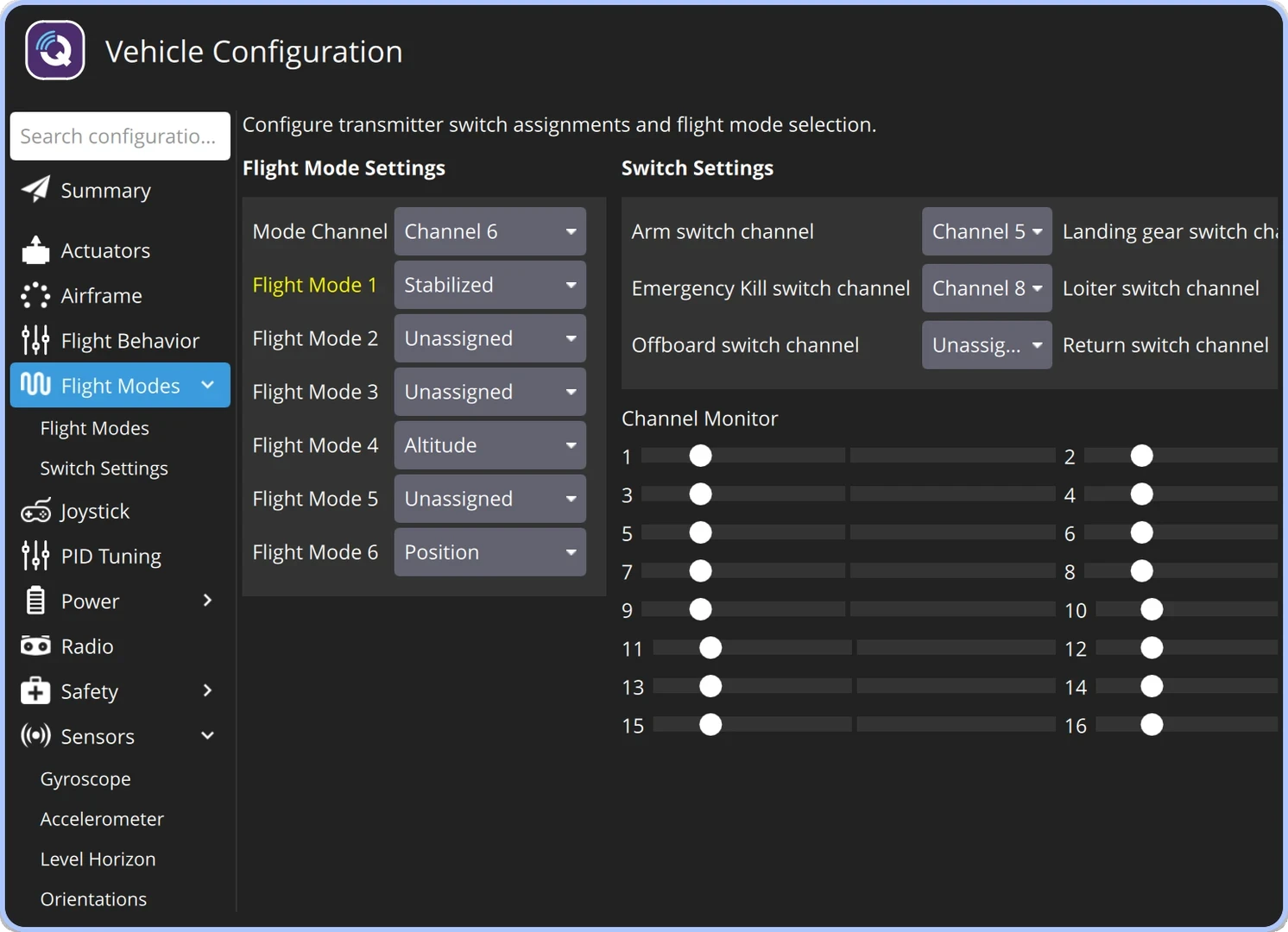
Flight Mode Configuration
Manual Control Modes
In manual modes, the pilot maintains direct control over the vehicle. Note that GPS, computer vision, and barometric data are not utilized in these modes.
Caution
Manual modes require a high level of piloting skill. Ensure you are confident in your ability to fly manually before attempting these modes.
STABILIZED / MANUAL — Attitude Stabilization. The pilot controls throttle, pitch, roll, and yaw. When sticks are released, the vehicle automatically levels itself in roll and pitch.
ACRO — Rate Control. The pilot controls throttle and angular rates. The vehicle will not auto-level after sticks return to center. Ideal for racing; requires significant experience.
RATTITUDE — Hybrid Mode. A blend of Stabilized and Acro. Small stick deflections behave like STABILIZED, while large deflections transition into ACRO-style control.
Sensor-Assisted Modes
ALTCTL (Altitude) — Altitude Hold. Uses a barometer (or other altitude sensors) to maintain a constant height. The pilot controls altitude changes, pitch, roll, and yaw.
POSCTL (Position) — Position Control. Uses GPS, barometers, and computer vision to manage position and movement speed. This is the recommended mode for standard flight, as it significantly reduces pilot workload.
Automatic Flight Modes
В автоматических режимах конструктор квадрокоптера выполняет заданную программу полета. Пилот не управляет им непосредственно с помощью стиков аппаратуры управления.
OFFBOARD enables control from an external computer (e.g., Raspberry Pi). This is the primary mode for autonomous research and robotics, including integration with ROS 2.
AUTO.MISSION executes a preloaded flight path. Missions can be uploaded via QGroundControl or through the MAVLink protocol.
AUTO.RTL. The vehicle automatically returns to its takeoff coordinates. Depending on your settings, the vehicle will climb to a safe altitude, fly to the launch point, and perform an automated landing.
AUTO.LAND performs an automatic landing at the vehicle’s current location. This is an ideal way to safely conclude a flight or can be configured as a failsafe in the event of a lost control signal.
For more detailed technical specifications, visit the PX4 Flight Modes.